Find where your offline conversions go missing
Trace a Google Ads lead from the click URL to the form, CRM, upload, and conversion report. The PDF walks you through each handoff.
Get the free PDF →Free Freak.Marketing account required. No card needed.
A completed upload is only one check
Suppose your CRM shows 20 qualified leads but Google Ads reports nine. The missing 11 may come from lost attribution, an import error, a different count setting, or a date comparison that does not line up. The upload status alone cannot tell you which one.
This PDF helps you check each handoff and keep a record of what you found. It covers website lead forms and later outcomes sent to Google Ads. It also shows where a test click ID is useful and where you need a genuine eligible ad interaction to verify attribution.
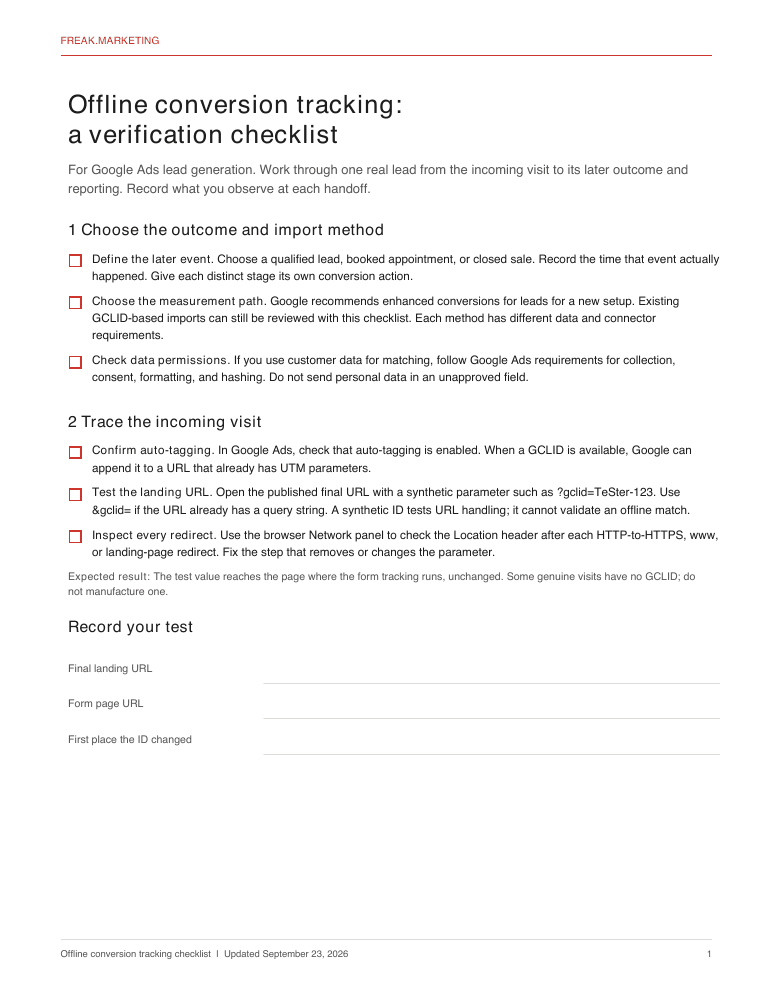
Check the click URL
Confirm auto-tagging is on, then follow a test click ID through the landing page and any redirects. UTM parameters can coexist with GCLID; a redirect that drops it is the problem to fix.
Follow the lead into the form
Check the submitted entry, including a visit that moves from the landing page to a separate form page. A value visible in the browser is not proof it reached the saved lead.
Check the CRM record
Compare the saved form entry with its CRM record. Look for an empty mapping, a shortened or changed click ID, and the actual date and time of the later lead outcome.
Review the conversion action
Name the outcome, check its count setting and conversion window, and confirm whether the campaign uses that action for bidding. These settings affect what appears in reports.
Inspect the import
Use the requirements for your chosen upload method. Check the conversion action, identifier, event time, and any errors shown for the upload job.
Reconcile what Google reports
Review offline data diagnostics, allow for processing time, and compare the same outcome and date basis in your CRM and Google Ads. A successful upload does not mean every event was attributed.
Who this is for
Use it if you manage Google Ads lead generation and need to check why a later qualified lead or sale is missing from conversion reporting. It works as a review list for an existing import and a planning list for a new one. Your form, CRM, and upload method may need different implementation steps.
Get the OCT Setup Checklist
Create a free Freak.Marketing account, then download the PDF from your members area. Your account also includes free Google Ads resources.
Create free account →Already have an account? Go to your downloads →
I built FormTrackr for teams that want to manage website form attribution and later Google Ads uploads in one app. If you would rather use a tool than maintain the process yourself, review the FormTrackr setup and pricing, then test it with your own form and conversion action.