Your Google Ads leads aren’t turning into customers.
Work through what your campaigns are counting as conversions and where the unwanted enquiries are coming from, so you can make better decisions about your ads.
Get lifetime access to the course →You’re getting calls and form submissions, but when you follow up, too many go nowhere.
Some people never answer. Others want a service you don’t offer, live outside your area, or are looking for a job. Your team spends time sorting through them, and you’re still paying for the clicks that brought them in.
Meanwhile, Google Ads shows conversions and a cost per lead that might look reasonable.
You’ve probably tried adding negative keywords or changing your ads. Those changes can help, but they leave an important question unanswered.
What is the campaign counting as a successful enquiry?
If you’re using conversion-based bidding to get form submissions, those submissions are what you’re asking Google to find. Unless you send back information about which enquiries were qualified, a submission from someone you can’t help may count toward the same goal as one from a potential customer.
Tracking mistakes can make that harder to untangle. A duplicate event or a conversion firing before someone finishes the form can leave you judging results that don’t match what your business received.
And sometimes the enquiry is genuine, but it falls apart during follow-up. You need to know that too before changing the campaign.
Work out where the enquiries are going wrong.
Google Ads Lead Gen Mastery helps you check the tracking and follow the enquiries through to what happened afterward.
You’ll work through how to identify unwanted traffic, qualify leads, and give Google Ads more useful information about the enquiries your business wants.
That gives you a clearer way to review performance. You can look at what you’re paying for a qualified enquiry and investigate why the others weren’t suitable.
When you make a change, you’ll have something more useful to assess than whether the conversion count went up.
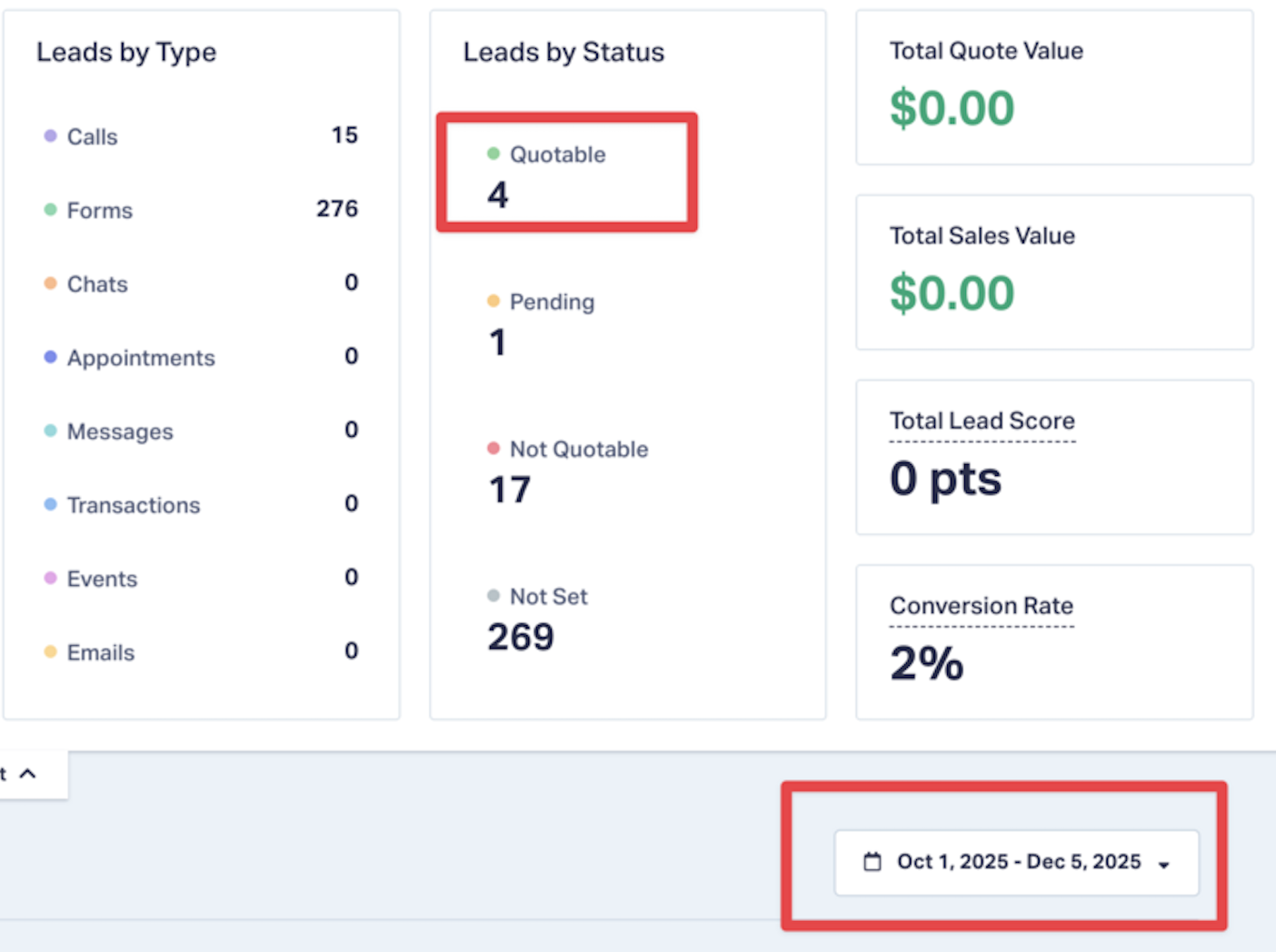
One client account, before and after.
The earlier report recorded four enquiries marked as quotable. The later report recorded 48.
October 1–December 5, 2025
December 5, 2025–January 18, 2026
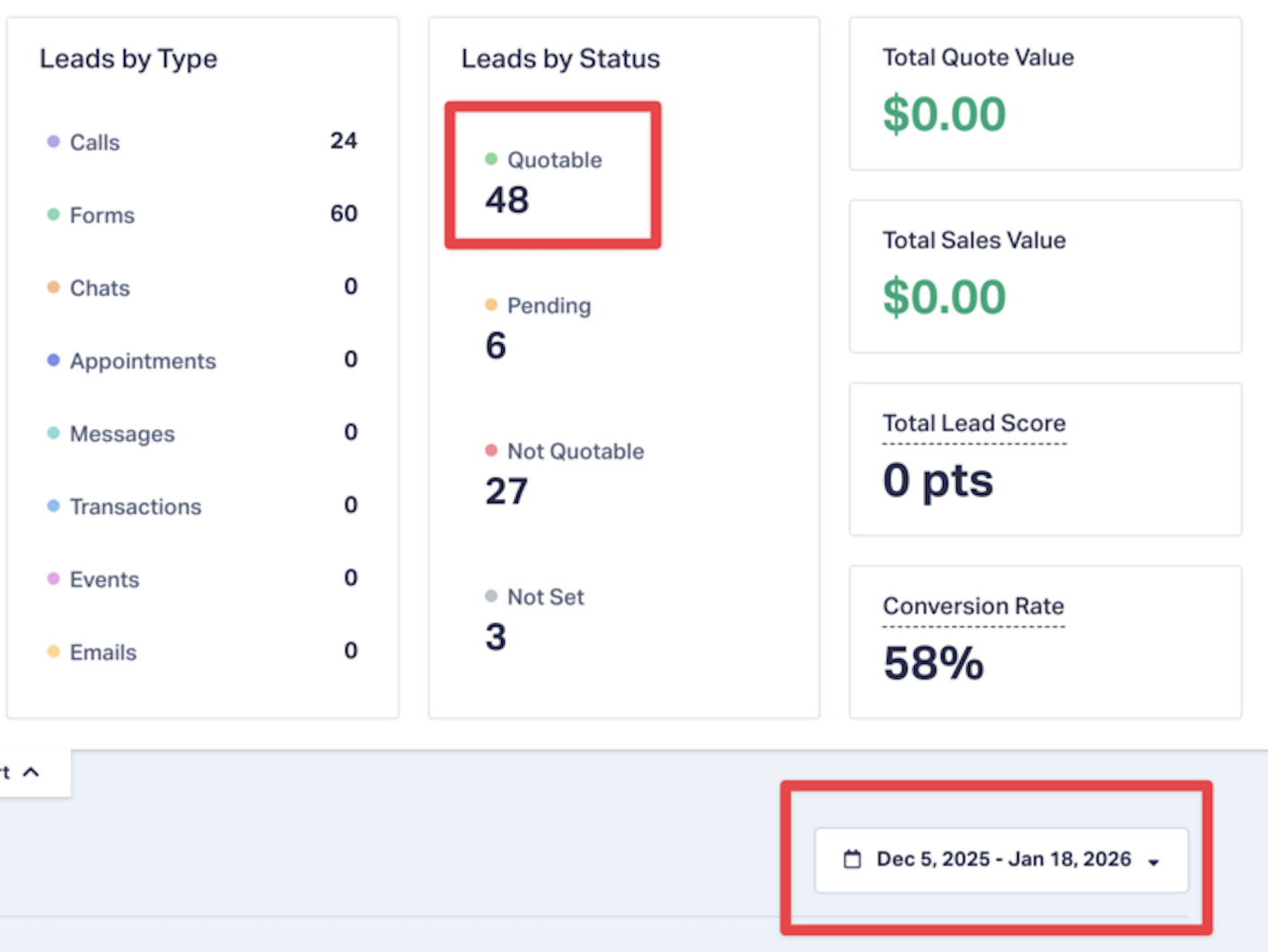
The screenshots show those enquiries recorded as quotable, meaning they were suitable to quote. That’s a different measure from closed sales.
For your own account, you’ll need to define what makes an enquiry worth pursuing and track what happens next. That’s how you can tell whether the campaign is bringing in opportunities your business can use.
Check what your conversion tracking is recording.
Find tracking problems that can inflate your results, including duplicate events and conversions that don’t represent a completed enquiry. Review which actions your campaigns are bidding toward.
Tell Google Ads which leads were qualified.
Work through qualification at the form level, CRM feedback and offline conversion imports, so you can connect an enquiry with what happened after it arrived.
Reduce spam and unwanted traffic.
Review the scripts, placement exclusions and audience settings covered in the course. Choose the controls that fit the source of the problem in your account.
Review search terms and spending regularly.
Use the weekly review process to spot irrelevant searches and decide what needs attention. Keep track of your changes so you can assess their effect on lead quality as well as cost.
“Steve fixed my Google Ad Conversion Tracking and has generated 155 conversions in just over 2 months with an average cost per conversion of $49. I highly recommend Steve to manage your Google Ad Campaigns.”
Dr. Scott Gray
Back In Motion
View more testimonials →Lifetime access to all 10 course lessons.
✓ 90-day implementation guarantee
Includes Google Ads Lead Gen Mastery, all other courses, Claude skills, future content and priority support.
- Everything in this course
- All other courses
- Claude skills
- All future content
- Priority support
✓ 90-day implementation guarantee
You’ll need an account you can work on.
The course is for people running Google Ads who can put the training into practice and review the results.
You’ll need to make changes in an active account, keep track of the enquiries you receive, and allow time to assess what happens. If you’re buying on behalf of a business, make sure you can get the information you need from whoever handles its leads.
The 90-Day Implementation Guarantee
If you apply the process for 90 days and still do not see meaningful progress in lead quality, we will work with you to identify what is missing. If that still does not move the needle, we will refund 100%.
To qualify, you agree to:
Put the course into practice in an active Google Ads account, keep it running consistently, and track your results. Ask for support when you get stuck so we have a fair shot to help you improve.
What “meaningful progress” looks like:
Fewer junk inquiries, fewer irrelevant clicks, and a higher share of qualified prospects. If, after 90 days of best-effort implementation and our assistance, those signals don’t improve, we’ll refund your purchase.
How to request a refund:
Email support within 90 days of purchase with simple evidence that you implemented the training and kept campaigns active. We’ll review promptly, help if we can, or issue a full refund.