What Does "Eligible (Limited)" Mean in Google Ads? (All Reasons + Fixes)

In Google Ads, "Eligible (Limited)" usually means your ad passed review but Google is narrowing where it can serve: policy-sensitive topics, trademarks, messy creative, or signals on your landing page—not necessarily that you should panic or pause.

"Eligible (Limited)" in Google Ads means your ad passed policy review but Google is restricting where it can show — by region, audience, network, or because your content touches a sensitive vertical like healthcare, alcohol, or trademarks. Your ad is not disapproved. It can run, just with a narrower delivery footprint.

Key takeaways

In Google Ads, Eligible (Limited) is one of those labels that sounds worse than it is. Your creative is generally not disapproved: Google is telling you it can run, but with restrictions on inventories, audiences, placements, regions, ages, or specific policy verticals tied to what you wrote or linked to.

This post breaks down what that status actually reflects, six practical reasons advertisers see it, how Google’s wording compares across ads versus assets versus full disapprovals, what it means when a new campaign warns you about a "limited audience," and how to decide whether to troubleshoot or leave a limited ad running and judge it on results.

What Does "Eligible (Limited)" Actually Mean?

According to Google’s definition, Eligible (Limited) is for ads or products that comply with policies but are still limited in where and when they can appear (for example, certain countries, ages, networks, or sensitive contexts).

Policy-based examples Google calls out include restricted verticals such as alcohol, gambling, healthcare, trademarks, moderately restricted sexual content, and situations where wording on your site, not just the ad itself, aligns with regulated industries even when your underlying offer is fine. In plain English: delivery is narrower than "Eligible," usually because automated review sees risk Google won’t attach to unrestricted traffic everywhere.

The fastest way to know your specific trigger is Google Ads itself: enable the Policy details column on the Ads (or Assets) view so hover text and explanations map directly to Google’s rationale.

The 6 Most Common Reasons Your Ad Is Eligible (Limited)

1. Trademark restrictions in headlines or descriptions

If your text references another brand’s trademarks in ways Google restricts, ads can stay active on some surfaces while being blocked or limited elsewhere. Fixes include clearing unnecessary brand mentions, rewriting to factual language you’re authorized to use, aligning with trademark-owner rules, or working through appeals when you genuinely have rights to the term.

2. Regulated verticals (healthcare, medicines, gambling, alcohol)

Campaigns touching alcohol, prescription drugs, speculative financial products, elections, certificates-of-need-heavy categories, gambling (including where certification is involved), or similar regulated topics often ship as restricted-serving placements by design—not as punishment, but compliance. Typical fixes mean completing certifications, narrowing geo and audience settings to allowed regions or ages, using approved disclaimers where required, and matching landing-page claims to compliant copy.

3. Moderately restricted content categories

Google labels some creative under policies like sexually suggestive moderation tiers; those frequently map to Eligible (Limited) inventory rather than a hard stop everywhere. Adjustment paths are usually toning visuals or language, narrowing placement types, confirming age gating aligns with creatives, then requesting re-review.

4. Unclear, irrelevant, or "confusing" messaging

You can earn a limitation when reviewers believe the RSA or Demand Gen variation is muddy: vague guarantees, cluttered offers, contradictory lines, emoji soup, bait-and-switch language, or copy that mismatches keywords and landing headings. Improvements are straightforward rewriting: clearer proof points, tighter promise + proof + CTA, matching intent on the headline and path, stripping sensationalism, testing a fresh RSA while observing whether the flagged version still converts.

5. Landing page wording that pings policy filters even if the offer is innocent

If your landing page echoes restricted vocabulary (loan guarantees, pharma-style claims, weight-loss timelines, speculative income, firearm accessories, recreational substances, gambling keywords, sexual services, political fundraising, medical outcomes, etc.) Google may keep the ad live but choke delivery to safer contexts. Cleanup means auditing above-the-fold text, disclaimers, and legal disclosures; removing boilerplate scraped from dubious industries; and ensuring policy-sensitive pages disclose credentials and approvals where Google expects them.

6. Geography, age targeting, or the "Eligible (limited all locations)" edge case

Sometimes geography plus policy interact so your ad technically cannot show in literal targeted regions but might still serve to audiences interested in those locations—a scenario Google defines separately (Eligible limited all locations). Fixing it often means widening allowed regions, simplifying geo expansion settings, aligning location intent settings with where you’re genuinely licensed or certified to advertise, then re-checking the Policy detail line item.

"Eligible (Limited)" vs "Approved (Limited)" vs "Limited by Policy" — What's the Difference?

Google divides language by entity type:

When teammates say "limited by policy," they typically mean hovering the limitation chip in Policy details—not a separate mystical status tier. Anything still collecting spend with impressions is materially different from a true disapproval, which earns zero auctions.

"Your new campaign is only eligible to serve to a limited audience"

That onboarding-style warning is broader than RSA policy flags alone. Separate from Eligible (Limited) at the asset level, new campaigns routinely enter states where Google restricts learning until identity checks finish, bidding models gather conversions, budgets can’t statistically explore segments, targeting is unusually tight combined with Smart Bidding, brand-new accounts lack baseline trust signals, or certain audience lists are too small.

Read the contextual tooltip or notification drawer; if it cites policy, chase Policy details first. If it cites learning signals, widen conversion tracking depth, consolidate duplicate campaigns fighting for identical users, loosen placement restrictions temporarily, introduce stronger creative breadth, lift budget slightly so the algo can probe, verify the account and domain, export logs to Rule Engine or scripts for pacing gaps, then reassess—not every "limited audience" message demands a rewrite of your ads.

Should You Fix It — Or Just Run It?

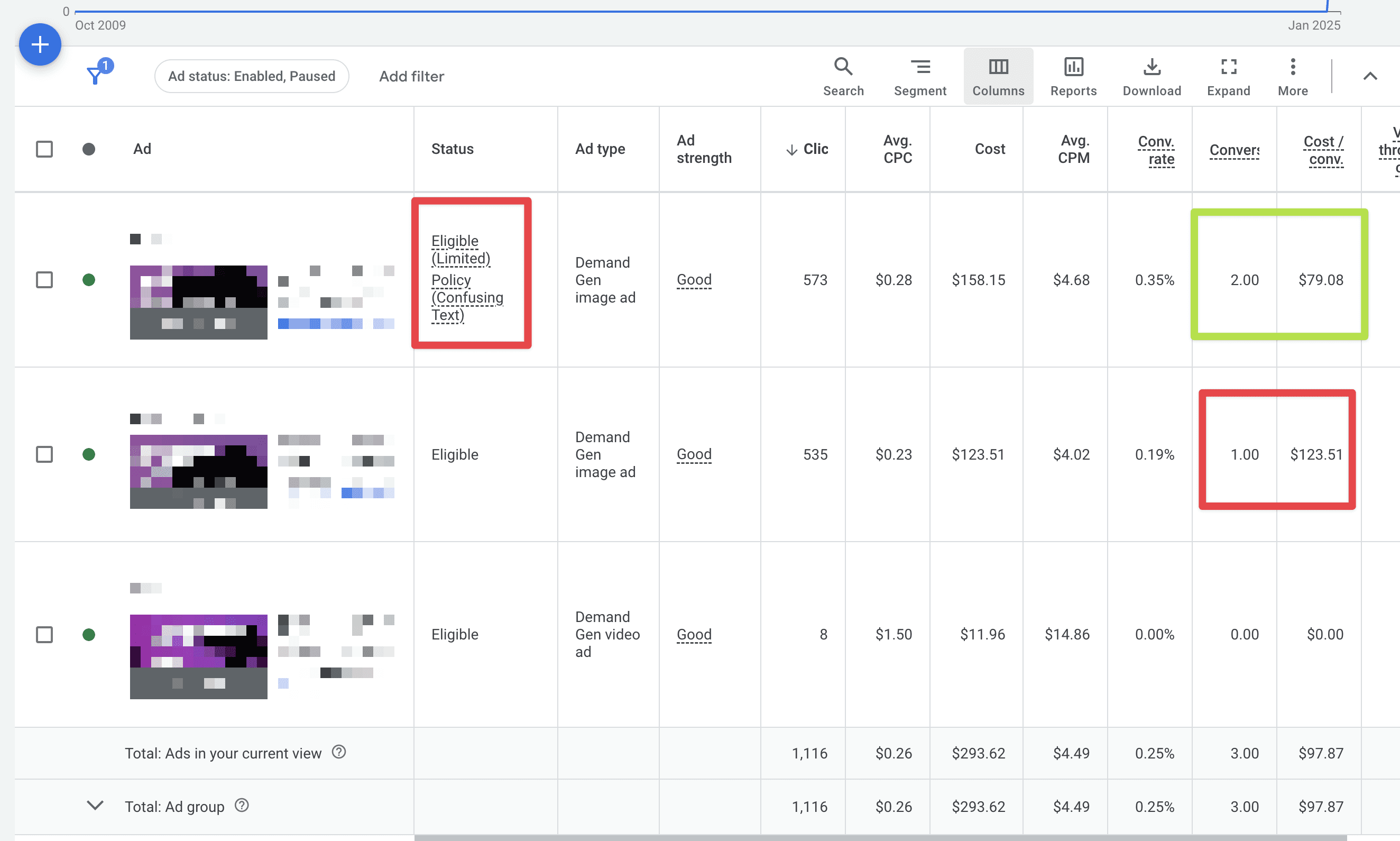
Let me share an example from a demand gen campaign I'm running. In this case, the ad is labeled as "limited" because Google Ads determined the copy was too confusing. This was actually the first time I've come across this specific ad policy. As you can see in the screenshot below, the "limited" ad is not only generating a lower cost per conversion but also driving more conversions than the other ads in the campaign. Not exactly what I'd call "limited"!

Now, I'll admit this is based on a relatively small dataset, so it'll be interesting to see how the ad performs over time. But for now, I'm not planning to pause it anytime soon.

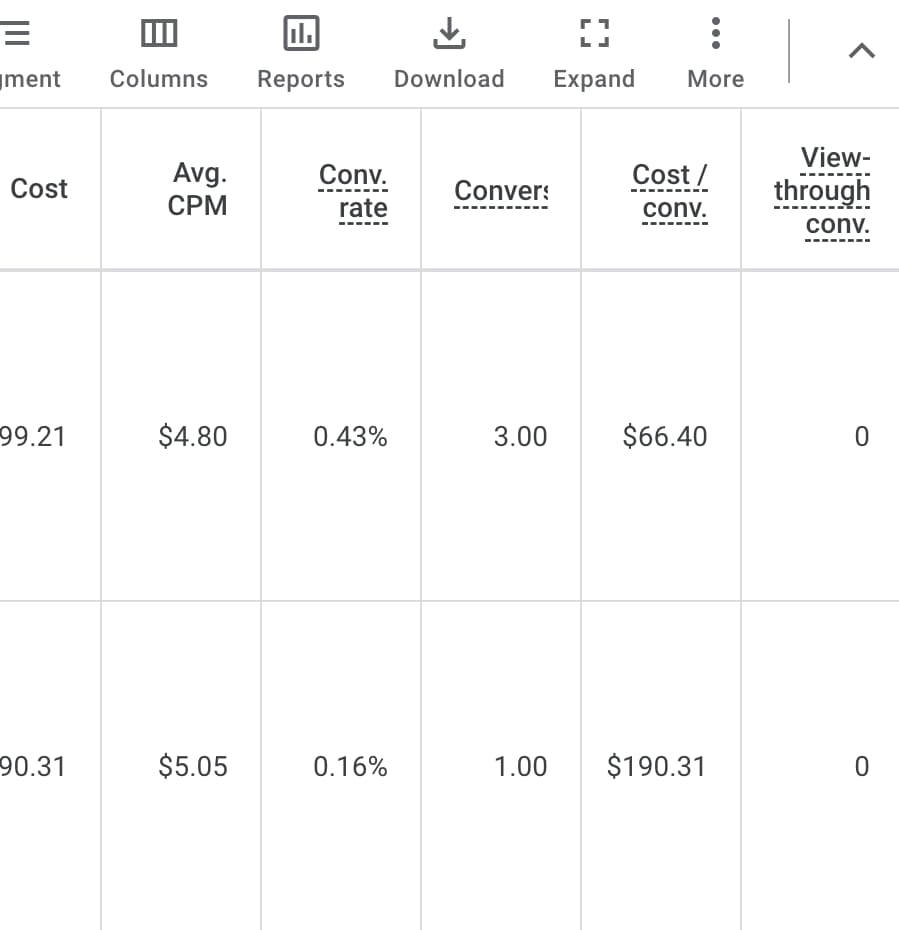
Update: As we've collected more conversion data, the "limited" ad is showing even stronger performance:

So, what's the takeaway here? While it's always a good idea to address any issues flagged by Google Ads, don't automatically dismiss an ad just because it's labeled as "Eligible (Limited)." Sometimes, these ads can outperform their "unlimited" counterparts. Testing and data are your best friends in these situations—let the results guide your decisions!

FAQ

What does Eligible (Limited) mean in Google Ads?
An ad cleared review but faces inventory, placement, geography, demographic, or policy-adjacent constraints so delivery is narrower than fully Eligible placements.

How is Eligible (Limited) different from Approved (Limited)?
Same concept, different noun: Ads show Eligible (Limited); many assets carry Approved (Limited). Both imply restricted serving, not outright rejection.

Why might my brand-new campaign warn about serving only to a limited audience?
Often onboarding friction: verification unfinished, scarce conversion signals, cramped budgets/targeting combos, bidding still calibrating, or policy nuance surfaced early. Cross-check Notifications versus Policy details to see which strand applies.

Does Eligible (Limited) hurt Quality Score?
You still accrue auctions where you qualify, but reduced reach can distort stats. Treat it like any creative experiment: isolate segment-level CPA/ROAS, watch impression share qualifiers, iterate copy or landing proof if efficiency drops.

Should I pause ads stuck on Eligible (Limited)?
Not by default—especially if KPIs outperform "clean" siblings. Pause or branch when reputational/legal risk climbs, disclaimers aren’t truthful, geography coverage no longer reflects your license footprint, or you’ve proven through testing that unrestricted variants outperform on margin.

Free course on exactly this

Stop Flying Blind — keyword research without Keyword Planner.

Five modules. Free with account. Walk away with a keyword list you built yourself.

Start the course